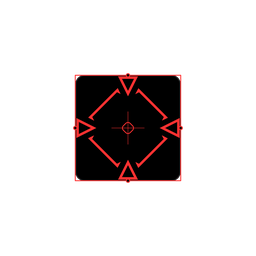
Every crosshair is built from modular components. Combine them freely: a ring plus a center dot plus four short lines is a typical design.
01 · Crosshair design
Crosshair design
Center dot
A filled dot at the exact center.
Line
A single line segment with an adjustable gap from the center.
Cross / Plus
Four arms up, down, left and right with per-arm gaps.
X-shape
Four diagonal arms with per-arm gaps.
Circle
A circle with optional arc gaps for gap-aim style crosshairs.
Ring
A ring of adjustable width with optional arc gaps.
Square / Rectangle
Box shapes with gap, fill, outline and corner controls.
Triangle
A triangle centered on the aim point, with 3-16 sides available.
Octagon
An eight-sided polygon: an octagon crosshair out of the box.
Video coming soon
Cross / Plus
Ring + center dot + four arms: one of the combinations the editor supports.
02 · Fine control
Gaps, caps and corners
Every component exposes position, size, thickness, rotation, color, opacity, fill and outline where it applies, and gap-capable shapes add arc gaps with per-gap position and size, a global gap position and cap styles. Squares, rectangles, triangles and octagons add corner styles (sharp, rounded, chamfered) and variable sides from 3 to 16. Changes preview live while you drag sliders.
Arc gaps can be placed independently around a circle or ring.
Cap and corner styles change the silhouette without changing the aim point.
Variable sides take an octagon from 3 to 16 sides.
Video coming soon
Circle
Arc gaps, caps and corner detail are edited in the same property inspector.
03 · Profiles and modes
Profiles and game modes
Profiles
Save any design as a named profile, duplicate it for independent edits, and set a default the app starts with.
Game modes
Group profiles per game. Hotkeys belong to the game mode's bindings, not to the profile, so the same key selects a different profile in every mode.
Instant switching
Press a key and the active crosshair is replaced immediately. Profile keys pass through to the game by default, so your movement and shots are never interrupted.
Video coming soon
Instant switching
One key replaces the active crosshair without interrupting the game.
04 · Placement
Global positioning
The Global Positioning card moves the whole composition with one X and one Y control plus a Center button. Component offsets stay untouched, the value is bounded to the active display, and every profile keeps its own saved position per monitor.
Video coming soon
Global positioning
One X/Y control moves the complete crosshair on the active display.
05 · Live preview
Live editor preview
The preview and the overlay share one renderer, so what you edit is exactly what appears in game.
Video coming soon
Live editor preview
The preview and the overlay render from the same model.
06 · The overlay
The overlay window
One window, always. Exactly one overlay exists at a time, with no stacking and no ghost crosshairs after switching.
Locked = click-through. While locked, every click passes to the game underneath and the overlay never takes focus.
Edit mode = drag. Unlock to drag the crosshair into place or type exact pixel offsets.
Physical-pixel positioning. Placement is computed in pixels through Windows APIs, so it stays put across monitors and DPI scales.
Monitor picker. Choose which display the overlay lives on; missing monitors are recovered gracefully.
Starts with Windows (optional). Single instance, tray-friendly, and a clean uninstall removes everything.
Practical details
Global lock/unlock and profile hotkeys keep working while the editor is closed.
Settings and designs persist to a plain local file with schema-versioned migration and automatic backup on recovery.
Self-contained package: no .NET runtime to download, per-user install, no administrator rights required.
No telemetry, no ads, no accounts: the app makes no network calls of its own; ownership is checked by the Microsoft Store.
Video coming soon
The overlay window
One click-through window that never steals focus from the game.
Known limitation:
in games that use an exclusive fullscreen mode (for example Fortnite), an external overlay may not be visible. Use borderless or windowed fullscreen if the crosshair does not show.
See the FAQ.
Every video is captured from the real Crosshair Easy build. Cards without footage yet say so; nothing is advertised that the app does not do.